
A shared planning map for the team
Give your team one map of the whole operation.
Attach your site register. You get every site on one map by rating and type, the areas that need attention shaded, and filters and search for the team.
Free to start. Seats for your team are paid.
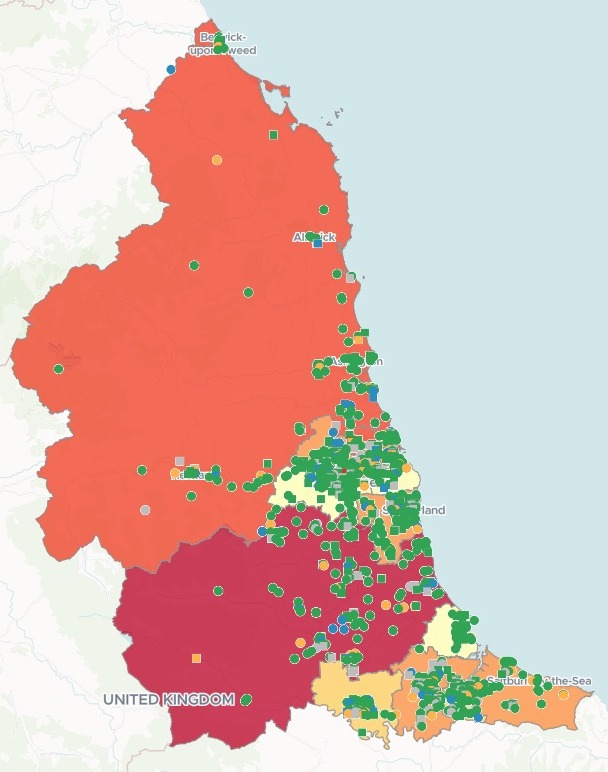
| Services by latest rating | Services |
|---|---|
| Good | 906 |
| Requires improvement | 70 |
| Outstanding | 68 |
| Unrated | 173 |
| Inadequate | 2 |
Areas run from pale yellow to deep red as more services need attention. Circles are care homes; squares deliver care at home.
For whoever plans the week across a patch
Inspection teams.Area managers.Estates and field teams.The register lists every site.
Where they sit, and which area needs you first, is not in it.
Shading each area by a count, here the sites with the two lowest ratings, makes a choropleth. With every site on top in the colour of its rating, the team sees the patch and the problems in one view.
Here you attach the register once. Mapstack brings in the official boundaries, or uses your own patches if you attach them, builds the map and its filters, and counts what you plan by.
From a register to the map the team opens
Columns: Location Name (each site’s name), Care home? (its type), Location Latest Overall Rating (its rating), Publication Date (when the rating came out). 1,219 rows. One row for each service, with its beds and coordinates, and no boundaries. Addresses and postcodes do instead of coordinates.
What you get
- The authority boundaries, brought in by Mapstack and shaded by how many services need attention.
- Every service on the map, in the colour of its rating, care homes told apart.
- Filters and search: by authority, rating and type, and by name.
- Each authority’s figures in its pop-up: services, beds and the count for each rating.
One real register
Every service in the region, and where to look first
The Care Quality Commission's published register of adult social care in the North East of England: care homes, and services that deliver care in people's homes. Mapstack brought in the boundaries of the region's 12 local authorities itself.
- Beds
- 26,920in care homes, totalled for each authority
- Long since rated
- 489services whose latest rating came out before 2023
- Most to watch
- 12services rated Requires improvement or Inadequate in County Durham, the most of any authority
| Local authority | Requires improvement or Inadequate | Unrated |
|---|---|---|
| County Durham | 12 | 28 |
| North Tyneside | 9 | 23 |
| Northumberland | 9 | 15 |
| Newcastle upon Tyne | 7 | 21 |
| Redcar and Cleveland | 7 | 8 |
| Stockton-on-Tees | 6 | 28 |
| Sunderland | 6 | 13 |
| Darlington | 5 | 5 |
| Middlesbrough | 4 | 14 |
| South Tyneside | 3 | 6 |
| Gateshead | 2 | 11 |
| Hartlepool | 2 | 1 |
It counts what the team plans by.
In one reply, with no questions back: a table for all 12 authorities of services, beds, the two lowest ratings, the unrated and those last rated before 2023.
Care Quality Commission, care directory (HSCA Active Locations), as at 2 November 2026 (Open Government Licence): adult social care services in the North East region. Boundaries brought in by Mapstack. Run on 15 November 2026.
Put the priority list on the map
Ask for the sites you plan by as a layer of their own.
It is the same map, changed, so the link the team already has still opens it.
Add the unrated and pre-2023 locations to the map as their own layer so the team can switch it on.
Mapstack made a layer of the 662 services, the unrated told apart from those last rated before 2023, and added it to the same map. The team switches it on and off in the legend. Each pop-up gives the rating, when it was published, the type and the beds.
How it goes
You bring the register. Mapstack brings the boundaries.
Attach your register and say what the team needs.
Mapstack builds the map and its filters.
You get the priorities. Here, the most services last rated before 2023.
Common questions
What happens to our register?
It stays in your workspace. Only people with a seat in your workspace can see it. Nothing leaves unless you publish it yourself.
It is not used to train AI. Your data and your conversations are not used to train AI models.
It is still yours. You keep ownership of what you bring in. Delete it and it is removed.
The full answer is in the documentation: Your data, privacy and security.
What does it cost?
Free to start. One seat, for you, with a starter amount of work each month. No card.
The map is on the free seat. With its filters, search, pop-ups and counts.
Seats for the team are paid. One for each person who opens the map, charged per person. Routines are on a paid seat too.
The prices are on the pricing page.
How does the team use it?
From one link. Share, then Copy link: everyone with a seat in your workspace can open it.
Without changing it. A Viewer seat opens the workspace’s work and makes nothing. The owner or an admin adds each person.
Current when the data is. A map shows its data as it is now. A routine can fetch the new register from your shared drive each week, or when you press Run now.
Map yours.
Free to start. Seats for your team are paid.