
Cemetery mapping
Put every burial record in its plot, on one map.
Attach your plot map and your burial register. You get one map showing which plots hold a burial, who is buried in each, and a surname search.
Free to start. No card.
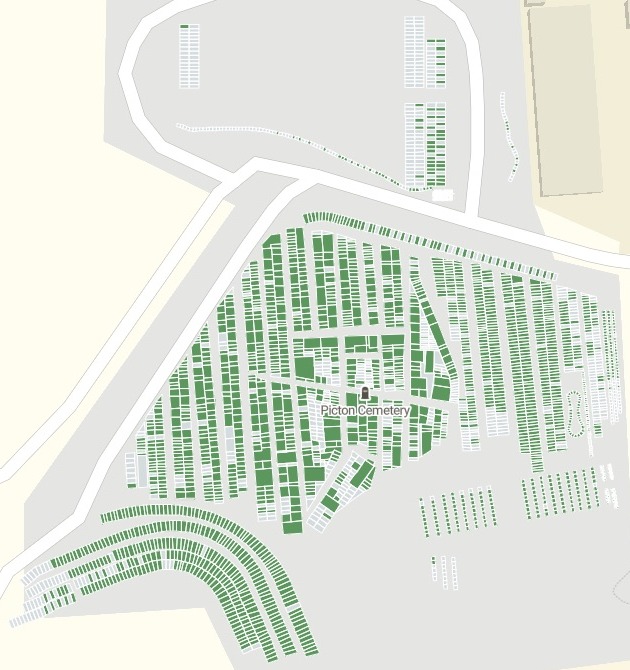
| Plot status | |
|---|---|
| Burial recorded | |
| Empty plot |
Every plot is drawn, the empty ones included, from the council's own plot map.
For bereavement services and sextons
The register has the names.The plot map has the places.
A family asking for a grave needs both.
The register holds names and dates but no locations. Each record carries a plot key, the code for its plot, and the plot map, often a shapefile (the file GIS keeps outlines in), has the same key on every plot.
Linked on that key, the two become one map of the cemetery: which plots hold a burial, which are empty, and who is in each burial plot.
From a register with no locations to a map of every plot
Columns: Name and age (who is buried), Dates (death and burial), Plot number (as staff say it), Plot key (the plot map's code), Office fields (kept off the map). 3,160 rows. With it, the plot map from the council's GIS: a zipped shapefile of every plot outline, the empty ones included.
What you get
- Every record in its plot, linked by the plot key, and a count of any that found none.
- Every plot coloured: burial recorded, or empty.
- A pop-up on each plot listing every burial or ashes in it, with the burial count.
- A surname search for the families who ask where someone is buried.
One real cemetery
A council's two files, one map of the cemetery
The plot map and burial register of Picton Cemetery, from Marlborough District Council's open data in New Zealand: one file from the council's GIS, one from its cemetery database.
- Unmatched
- 0burial records left without a plot
- Empty
- 917plots with nobody recorded in them
- One surname
- 39 plotsfor a common surname typed into the map's search box
| Status | Plots |
|---|---|
| Burial recorded | 2,096 |
| Empty plot | 917 |
The counts came back with the map.
Where a plot holds several burials or ashes, its pop-up lists each person. Plots with nobody recorded stay on the map, so the empty ones show at a glance.
Marlborough District Council, New Zealand, open data: Cemetery Plots, all plots and plots with burial details, Picton Cemetery, downloaded 15 November 2026 (Creative Commons Attribution 4.0). Run on 15 November 2026.
How it goes
You bring the two files. Mapstack does the linking.
Attach the plot map and the register and name the plot key.
Mapstack colours every plot by whether a burial is recorded.
Open a plot and see who is buried there.
Common questions
What happens to our register?
It stays in your workspace. Only people with a seat in your workspace can see it. Nothing leaves unless you publish it yourself.
It is not used to train AI. Your data and your conversations are not used to train AI models.
It is still yours. You keep ownership of what you bring in. Delete it and it is removed.
The full answer is in the documentation: Your data, privacy and security.
What does it cost?
Free to start. One seat, for you, with a starter amount of work each month. No card.
This job is on the free seat. Maps, datasets, analysis, your own files and public sharing are all included.
Pay per person for more. A paid seat brings more work each month, and seats for your team.
The prices are on the pricing page.
How does the search work?
Type a surname or a full name. The plots that hold it are listed, each by division and plot number.
Pick one to open it. The plot’s panel names everyone recorded in it, with their dates and age.
Or see them all. The full list of matches opens in the table.
Map yours.
Free to start. No card.