
Report figures, one style
Make every figure in the report look like one set.
Brief Figure 1. You get each next figure on the same layout, scale and title block, and you can revise any of them by letter.
Free to start. Print-ready sheets on a paid seat.
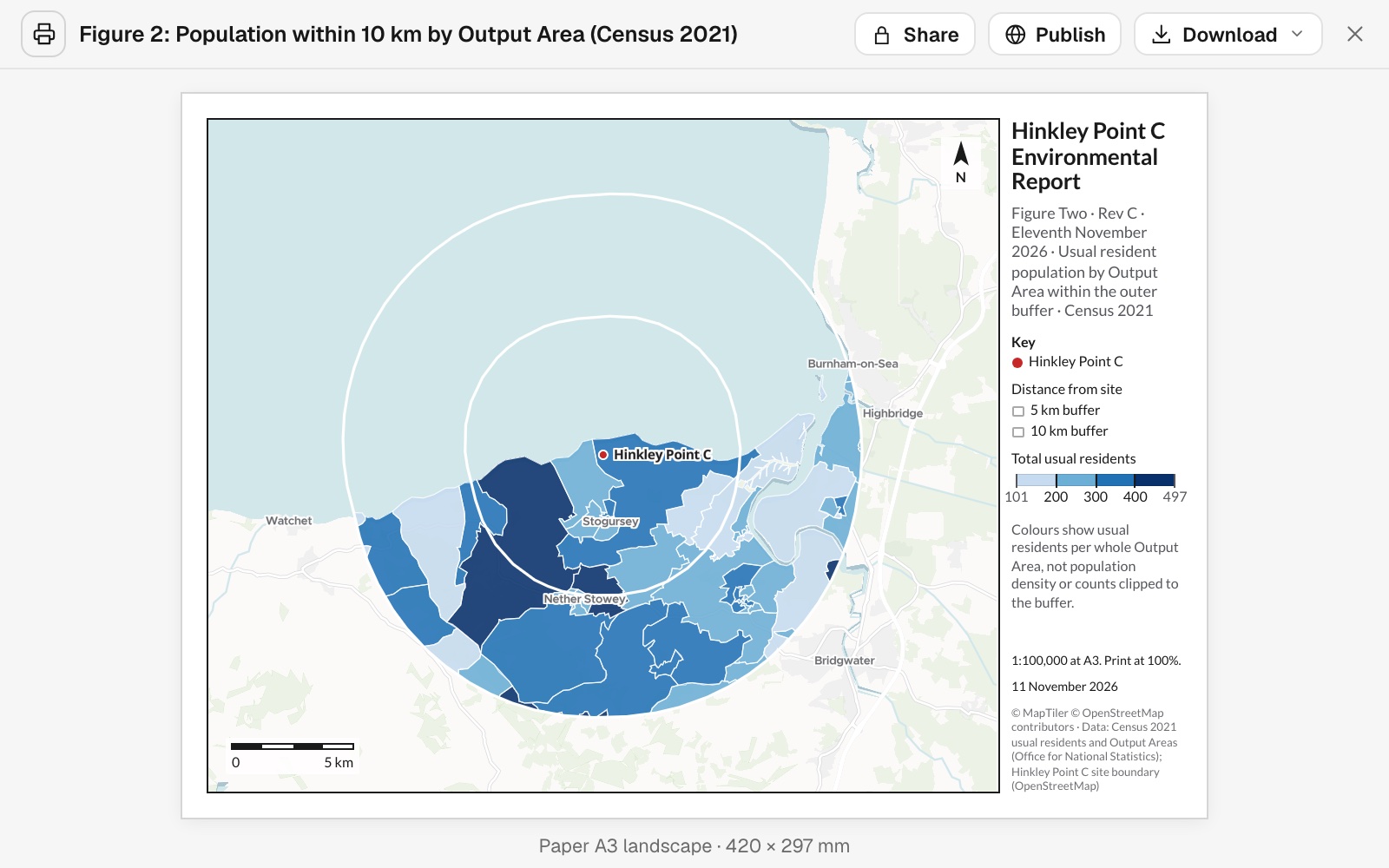
| Within 10 km of the site | |
|---|---|
| Output areas | 59 |
| Usual residents, Census 2021 | 11,399 |
| Scale, as Figure 1 | 1:100,000 |
The colours show each whole output area. The total counts areas cut by the ring for the part inside it.
For consultants, planners and environmental teams
A report goes out with a numbered set of figures.Every one has to match the others.
And the next project needs the same figures again.
Keeping them consistent by hand means a template file, a checklist and someone careful.
Here Figure 1 sets the layout. Every figure after it, and the next site, is made on it. Revisions go by letter, and change only what you name.
The usual figure, for the next site
The set you made once becomes the house layout.
It is a new print, so the first project's figures are unchanged.
Now our usual site location plan for the new project, Sizewell C in Suffolk: same layout as Figure 1, re-centred, title block updated.
Mapstack found the new site, drew its rings the same way and made the plan on the same layout: A3 landscape, 1:100,000, the same title panel with the new project's name, the same circle for the site.
How it goes
Check Figure 1 hardest. Every figure after it is measured against it.
Brief Figure 1, with your title block.
Ask for the next figure on the same template.
Revise by letter.
The step-by-step guide is in the documentation: Make a set of figures in one style, and the same figure for the next site.
Common questions
What does it cost?
Free to start. One seat, for you, with a starter amount of work each month. No card.
The maps and the analysis are on the free seat. With your own files and public sharing.
The figures as PDFs or pictures are on a paid seat. Paid seats are per person, and bring more work each month.
The prices are on the pricing page.
What stays the same across the set?
The layout. Paper size, scale, title panel and key.
Your house style. Name it once, for the figure number, revision and date.
Earlier figures. Each figure is its own print. A revision never changes another.
Does it ask before it guesses?
Yes, for what it cannot know. In the example, whether there was a site boundary file, and the project title.
And it says what it did. The rings were drawn from the site boundary, not a point, and the sheet says so.
Make yours.
Free to start. Print-ready sheets on a paid seat.