
A scheduled refresh from the source
Keep a map in step with the list it comes from.
Point Mapstack at a list someone else keeps up to date, such as an open-data register. You get the map, and instructions for a routine that refreshes it.
Free to start. Routines are on a paid seat.
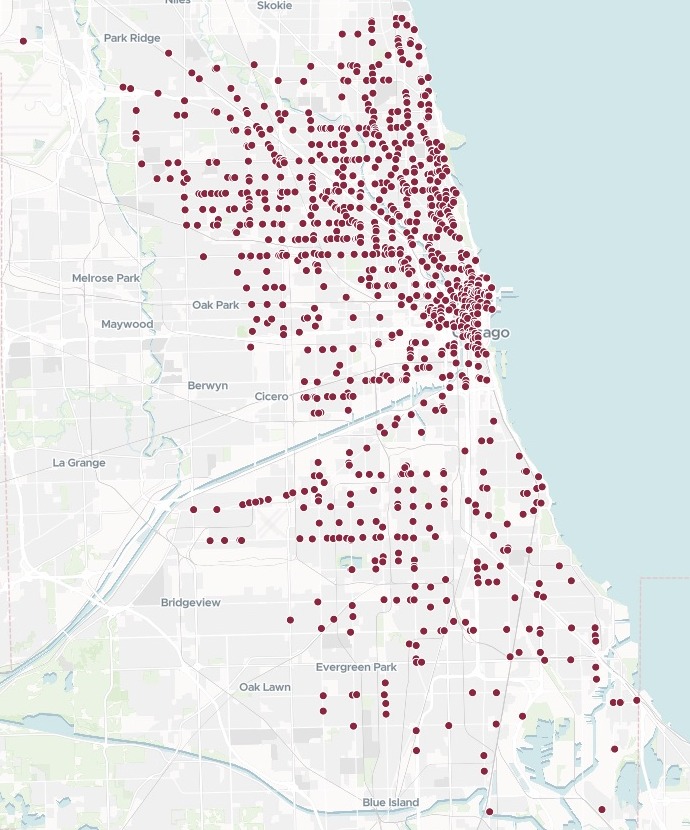
| From the city's register | |
|---|---|
| Licensed stores | 1,045 |
Mapstack fetched the register from its link, then wrote the instructions for a routine to refresh it every weekday.
For anyone whose list lives somewhere else
A licence register the city updates every day.A site list a colleague keeps in a shared drive.
The map made from it last month still shows last month.
Keeping up usually means downloading the list again and remaking the map, every time it changes.
Here the map is made once. A routine, a job Mapstack runs for you on a schedule, fetches the list again and updates the dataset and the map in place. That is a scheduled refresh, and nobody downloads anything.
One link in, a working map out
Columns: Trading name (the name over the door), Address (the street address), Ward (and community area), Expiration date (when the licence runs out), Latitude, longitude (where it is). 1,045 rows. Fetched by Mapstack from its link. Nothing downloaded.
What you get
- A point for every store, placed from the register’s own coordinates.
- Name, address, community area, ward and licence expiry when you click a store.
- Search by name or address, and filters by ward and community area, added without being asked.
- The routine’s instructions, written to paste: where the data comes from, and which dataset and map to update.
Make the routine safe to leave alone
Nobody is there to answer when a routine runs. So ask for instructions that cover what could go wrong.
Set the floor a little under the day’s count, and a short download stops the run before it touches the map. A run knows when the routine last ran, so it can say what changed since then.
Rewrite the routine instructions so they name the dataset and map by their titles, say what to do if the download fails or looks wrong, and have each run say how many stores were added and how many dropped since the last run.
Mapstack named both by title and wrote the brief in four parts. Download from the link. If the fetch fails or comes back with fewer than 950 stores, stop, change nothing, and say so in the run's summary. Compare with the current dataset and report the total, the stores added and the stores that dropped off. Then update the dataset behind the map.
How it goes
Paste the link and say what each point should show.
Mapstack maps it straight from the source.
Set up the routine in Settings and paste in the instructions.
Other lists, other schedules
The same job, wherever the list is kept and whatever says it has changed.
A file in a shared drive
Connect Google Drive, OneDrive or Dropbox, and a routine fetches the file again each time it runs.
- Map our accounts from accounts.xlsx in our Google Drive, then write the instructions for a routine that fetches it again every Monday at 8am and updates the map.
After someone edits it
A routine can run when a dataset in Mapstack is edited, once the editing stops.
- Write the instructions for a routine that runs after anyone edits our store list, and says which wards gained or lost a store since the last run.
When another system says so
Your own system can start a routine with a call: when a nightly export finishes, say.
- Write the instructions for a routine our nightly export can start when it finishes, fetching the new file from its link and updating the map.
Common questions
What happens to our list?
It stays in your workspace. Only people with a seat in your workspace can see it. Nothing leaves unless you publish it yourself.
It is not used to train AI. Your data and your conversations are not used to train AI models.
It is still yours. You keep ownership of what you bring in. Delete it and it is removed.
The full answer is in the documentation: Your data, privacy and security.
What does it cost?
Free to start. One seat, for you, with a starter amount of work each month. No card.
The map from your link is on the free seat. With your own files and public sharing.
The routine that refreshes it is on a paid seat. Paid seats are per person, and bring more work each month.
The prices are on the pricing page.
How will I know it ran?
Each run is listed. Under Runs on the routine’s page: when it started, and whether it succeeded.
Each run says what it did. Open it to read the whole session, with any assumption it made.
The dataset keeps its versions. Go back to an earlier day’s list when you need it.
Keep yours in step.
Free to start. Routines are on a paid seat.