

Build an app
Mapstack builds a small web app around your data for a named audience, with the search, selection and panels they need, at its own link.
An app is a small web tool built around your data for particular people to do one job with it: look up an area and see its figures, compare it with the rest, find the nearest site. It has a map, but it is laid out around the job, with its own search, panels and design, rather than as a map with a legend.
Ask for an app when the people using the data need to pick something and get answers laid out for them: a lookup for colleagues ("find my ward and see how it compares"), an explorer for a board or the public, a tool a team uses to answer the same question many times. The asks on this page are examples of the kind of thing to say.
- Who can use it
- Creator and Creator Max. Anyone in the workspace can open it; anyone at all once it is public.
- You provide
- Datasets, who the app is for, and what they must be able to do
- You get
- A web app at its own link, to share or publish
Build an app for a job
Tell Mapstack:
- The data, as datasets in your workspace.
- Who it is for.
- What they must be able to do, and the questions it should answer.
On one job, Mapstack built an app for council colleagues from an analysis of walking access to bus stops in Liverpool's 64 wards. People search for a ward or select it on the map, and see its stop count, residents, and the share within a 400 m walk, with how far it sits above or below the city figure of 92.9% and a comparison with the other wards. The app chose its own colours and layout, different from the map's.
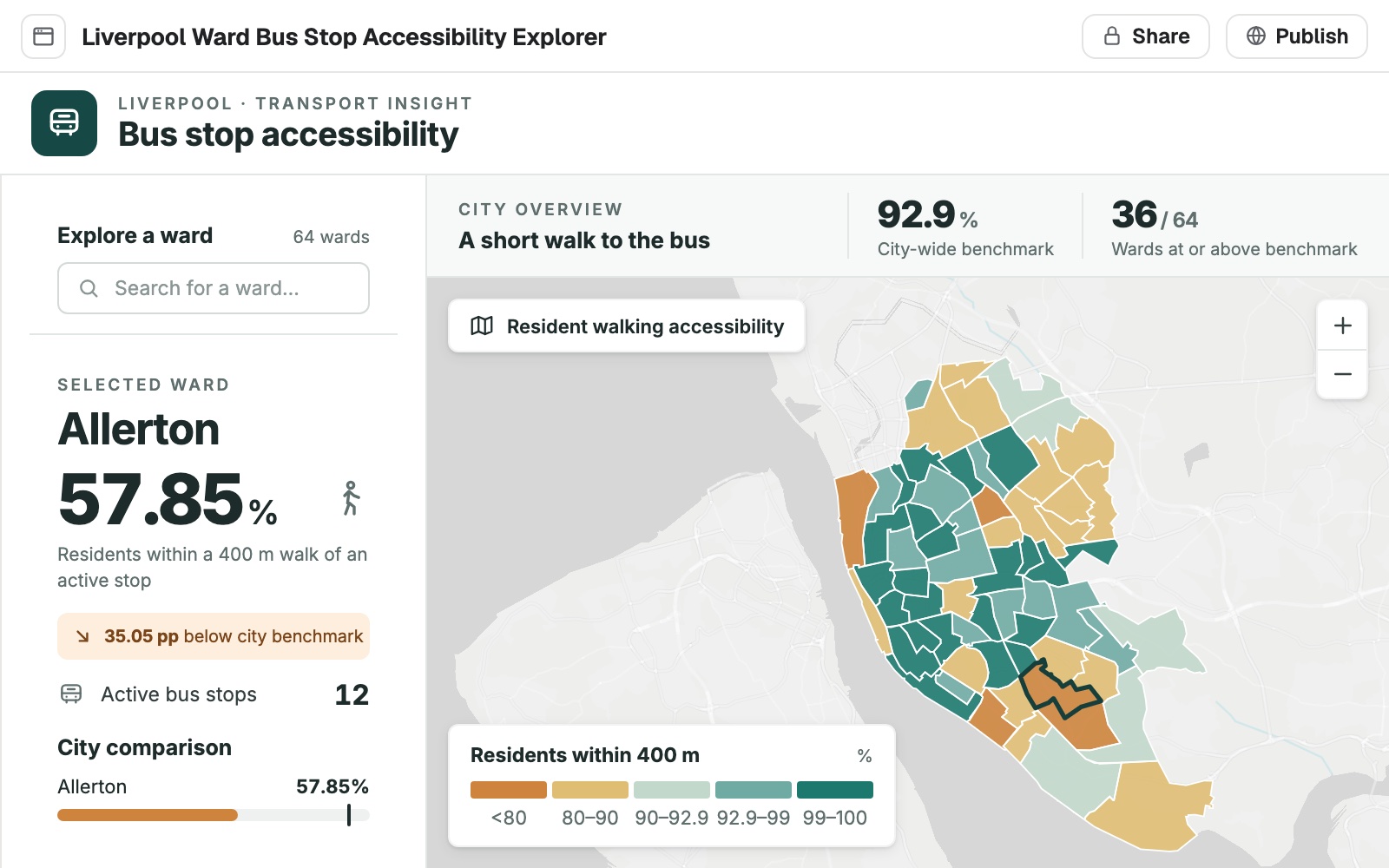 Example: the ward explorer built for council colleagues, open beside the conversation with Allerton selected: 57.85% of its residents within a 400 m walk of an active stop, 35.05 points below the city benchmark.
It is tried in a real browser before it goes live. Each build is compiled, opened in a browser, tried at phone and tablet sizes, and reviewed from a picture of the screen. Only a build that compiles and loads is published; the app you had stays as it was until then. Mapstack tells you what the checks found and which ran.
The app opens beside the conversation, with Share, Publish and a full-screen button at the top. It is listed under Apps in your Library. Each build uses part of your allowance. See Your allowance.
A lookup is a good first app. A reader types a name or a reference, sees every match in a list and picks one. The map goes to it and shows its details, with "Not recorded" where the source is blank. This works on plots and parcels as well as on areas and points.
Build an app
Say who it is for, what they must be able to do, and what they should see. Name the data if the conversation holds more than one candidate.
Build a small web app for council colleagues: search a ward by name or click the map, and see its stop count, residents, and the share within a 400 m walk, ranked against the city average.
Change what it does or how it looks
You can change an app in any conversation that holds it. To start from the Library, open the app's ⋮ menu and select Open in new session. Name the app you want to change when the conversation holds several.
A change keeps the rest. A change alters what you asked for. The look chosen on the first build stays.
It asks which part you mean. If your words fit more than one part of the app, Mapstack asks rather than guessing.
When the checks find something to improve in a published app, a Fix issues button with their number appears at the top. Select it to hand them to Mapstack.
Change one part of it
Describe the change as you would to a colleague who cannot see your screen. Mapstack is told what to change, not shown, so name the part of the app you mean.
Move the legend to the bottom-left
Change how it behaves
Say what you do in the app and what should happen.
When I press play, step through the months one by one and keep the map in view
Go back to an earlier build
Each build leaves a card in the conversation.
- On the card of the build you want, select Revert. Or select Version at the top of the app and pick the version.
- Select Restore.
The app goes back to that build. The conversation is kept, and datasets and maps are not touched. Each build that passed its checks is a version, so the restore is saved as a new version and the one you left stays in the list. To undo it, select Undo on the card of the build that was set aside, then Restore. Going back to an earlier build uses none of your allowance.
Keep it up to date with your data
It uses a copy of the data. An app is built from a copy of each dataset, taken when the build starts. A routine updates datasets and maps, and leaves apps alone: an app changes only when someone asks in a conversation.
Bring it up to date with new data
When the data has moved on, ask for the app to be brought up to date.
Share it or make it public
It is private until you publish it. People with a seat in your workspace can open it. Someone else opening the link is asked to sign in, or to ask for it to be published.
To make it public:
- Select Publish at the top of the app.
- Choose Public.
- Select Make public.
- Select Copy link.
Reference
| Apps per conversation | Several. Ask for the app you want to change by name |
| Builds at a time | One |
| Data | Datasets your workspace holds |
| What runs in it | A map with MapTiler basemaps, your data read in the browser, charts, location, file download, the clipboard, and picking a photo or file |
| On a phone | Panels leave at least half the screen for the map when it opens |
| Where it lives | At its own link. Private to your workspace until published |
What it can't do
- Save what people do in it for others to see. It has no server, sign-in or shared storage; anything it saves stays in that one browser.
- Use the camera, the microphone or screen capture.
- Be changed by a routine. An app changes only when someone asks.
- Use imagery, scenes, or data your workspace does not hold as a dataset.
- Be downloaded, or appear in a project's tabs.
- Be built or changed from a Free or Viewer seat.
Common questions
Can people outside my workspace use it?
Once you publish it, anyone with the link can open it, with no account. See Make something public.
How do I change one part of the app?
Name the part, as you would to a colleague who cannot see your screen: "Move the legend to the bottom-left". If your words fit more than one part, Mapstack asks which you mean.
Can I go back to an earlier version?
Yes. Select Revert on the card of the build you want, or pick it from Version at the top of the app, then Restore. The conversation, datasets and maps are not touched.
Can I build a second app?
Yes. A conversation can hold several apps. Ask for the one you want to change by name, or open an app from the Library in a new conversation to change it there.
Does the app update when the data changes?
It is built from a copy of the data, so ask Mapstack to bring it up to date. A routine leaves apps as they are.